Sunthetics Structure and Core Workflow
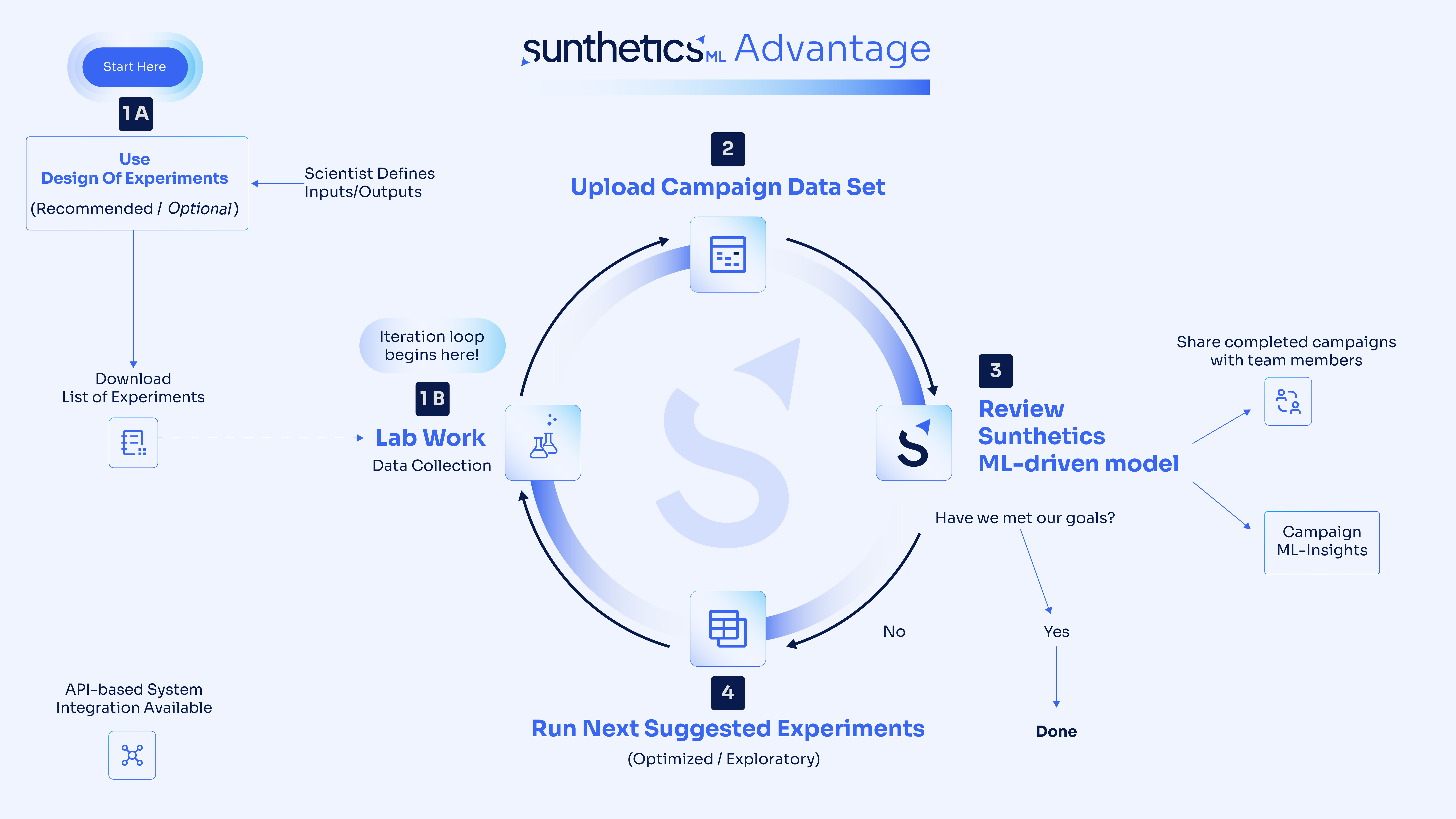
Sunthetics is organized around two connected workflows:
- Generating DOE (Design of Experiments) — used to plan the first set of experiments to conduct before data collection begins
- Creating ML Campaigns — used to model results and predictions, generate optimized experimental suggestions, and improve performance over time based on new data that is fed back into the ML model
Key Sunthetics Terms
DOE (Design of Experiments)
A DOE is the starting point when you do not yet have data for your experimental system. Sunthetics unique DOE design helps generate a balanced, space-filling set of experiments across the input space so you can collect a strong initial dataset.
In the Sunthetics DOE module, users define input variables, ranges or allowed values, constraints, and the desired number of experiments to generate. The output is an exportable list of experiments to run.
Campaign
A Campaign is the main project workspace where users upload experimental or simulation data, define goals, and generate a custom ML model for that dataset. Sunthetics Campaign models are unique and are not trained on other customer or user data. Campaigns are where optimization happens after initial training data has been collected.
Iteration
An Iteration is a new cycle of learning within a Campaign. Whether starting a new campaign or creating a new version of an existing campaign, each new campaign Iteration has a bespoke ML model created for the uploaded dataset.
After running the suggested experiments recommended by a campaign, users add the new results back into the Campaign so the model can improve and produce better next-step recommendations. Iteration is the core of the closed-loop optimization process, and an "Iteration" on the platform refers to each unique campaign run that generates a new ML model.
Version
A Version is an updated state of a Campaign created when new data is added and the Campaign is rerun. When a new Campaign is created, it always starts with Version 1. In practice, each version reflects the model as it learns from more experimental results over time. New versions can be created when new data is introduced for the model's active learning loop OR when configuration changes are made to input variable ranges, constraints, or output optimization goals.
End-to-End Sunthetics Workflow
Step 1: Build a DOE
Start by creating a DOE to plan the initial experiments. Sunthetics DOE is optional (i.e., you can build a campaign based on existing data), however training datasets collected from Sunthetics DOE experiments are proven to be the best starting place or the Campaign ML model.
In this step, users:
- Define input variables
- Set variable characteristics such as ranges or accepted values
- Apply system constraints
- Choose how many experiments to generate
The result is a curated experiment list to run in the lab or simulation environment. *Not every DOE experiment must be run to start a campaign.
Step 2: Run experiments and collect initial data
After generating the DOE, the team runs those experiments and records the outputs. This becomes the initial training data for your Sunthetics ML campaign.
Step 3: Create a new Campaign
Once training data exists, users create a Campaign on the platform. During Campaign setup, they:
- Enter campaign details and metadata
- Upload the data set as a .CSV or .XLSX
- Configure inputs, outputs, variable types, and ignored columns
- Define input ranges and constraints
- Set optimization targets for each output
- Rank output goals
- Choose the number of Optimized Suggestions and Exploratory Suggestions
Step 4: Sunthetics generates an ML model
Sunthetics uses the uploaded data, system context, and goals to generate a custom machine learning model for that Campaign. The platform uses ML and Bayesian optimization to support decision-making for the next experiments.
Step 5: Review campaign insights and suggestions
After model generation, the finished Campaign provides:
- Suggested next experiments
- Optimized suggestions tied to the user’s campaign goals
- Exploratory suggestions to fill gaps in the data and reduce model uncertainty
- Model error metrics
- Plots and visualizations
- Insight into variable importance and system interactions
Step 6: Run the "next best" suggested experiments
Users then run the recommended experiments in the lab or simulation workflow and collect the new results.
Step 7: Iterate on the Campaign
The new results (data) are added back into the Campaign. This creates a new Version and starts the next Iteration, allowing the model to improve over time and produce better future recommendations.